Looklet’s Game-Changing Approach to Managing Product Availability
Keep Your ‘Shop The Look’ Imagery Up to Date with Out-of-Stock Alerts in Styling Software
Published byLooklet/October 23, 2024
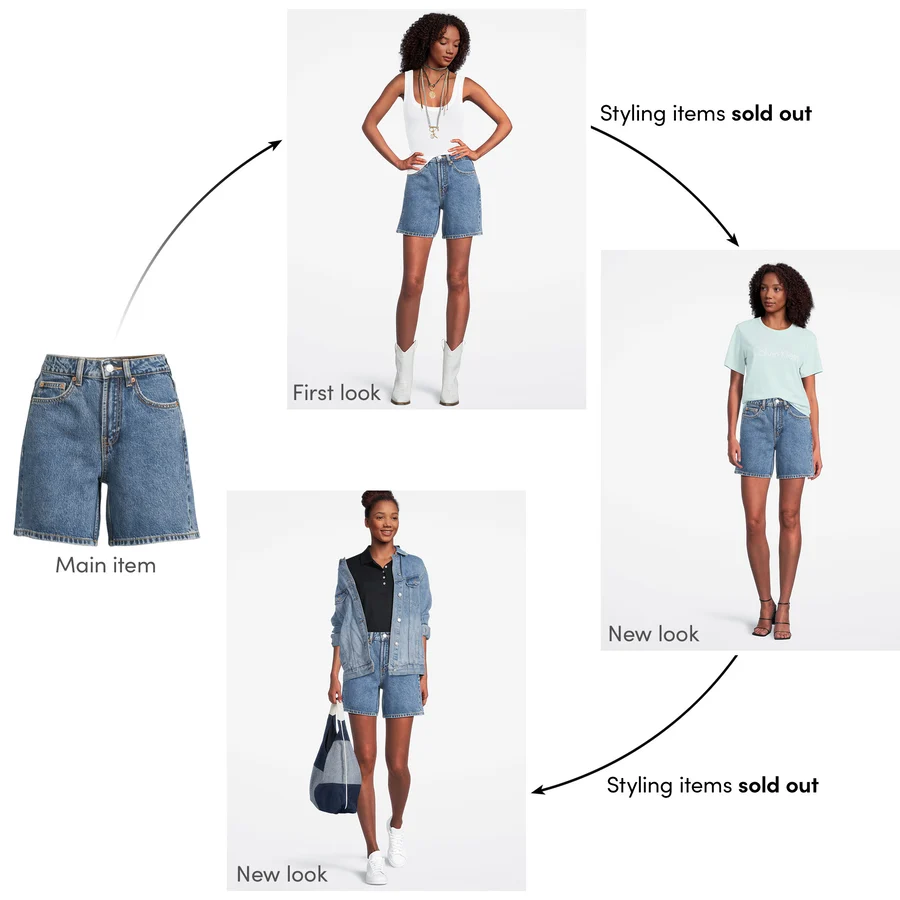



With traditional on-model photography, capturing and styling items into looks is typically confined to one point in the image production workflow: during the time of shooting. E-commerce apparel retailers consistently face the year-round challenge of ensuring that all the items displayed online are actually in stock. This challenge becomes evident when items sell out, yet they remain “stuck” in images alongside available items. This leads to customer confusion and negatively impacts the inventory turnover rate by potentially not showing in stock items that could have been displayed. These available items might have triggered a buying decision when the customer was in the mood to buy.
In the past few years, advancements have been made allowing retailers to link warehouse inventory numbers to e-commerce product description pages. However, only recently can retailers swiftly restyle and proactively fix product images that have out-of-stock items by changing the styling images on demand in mere seconds. Looklet’s image production studio, coupled with our flagship software, Look Creator, revolutionizes this process. Looklet is an innovator in the industry with our automated on-model fashion imagery tool that allows you to shoot all of your items in the Looklet studio and keep single, stand-alone item images in your image library, accessible via our styling app, Look Creator.

By shooting every item individually in the Looklet Studio you have images of items that are not forever “stuck” together as shot in a traditional photo studio, allowing for shooting items once and styling them unlimited times using any other items from your Look Creator image library. Search, style, and export new combinations – all within seconds in Look Creator. As a result, your styled looks online will now always display only available, purchasable items.
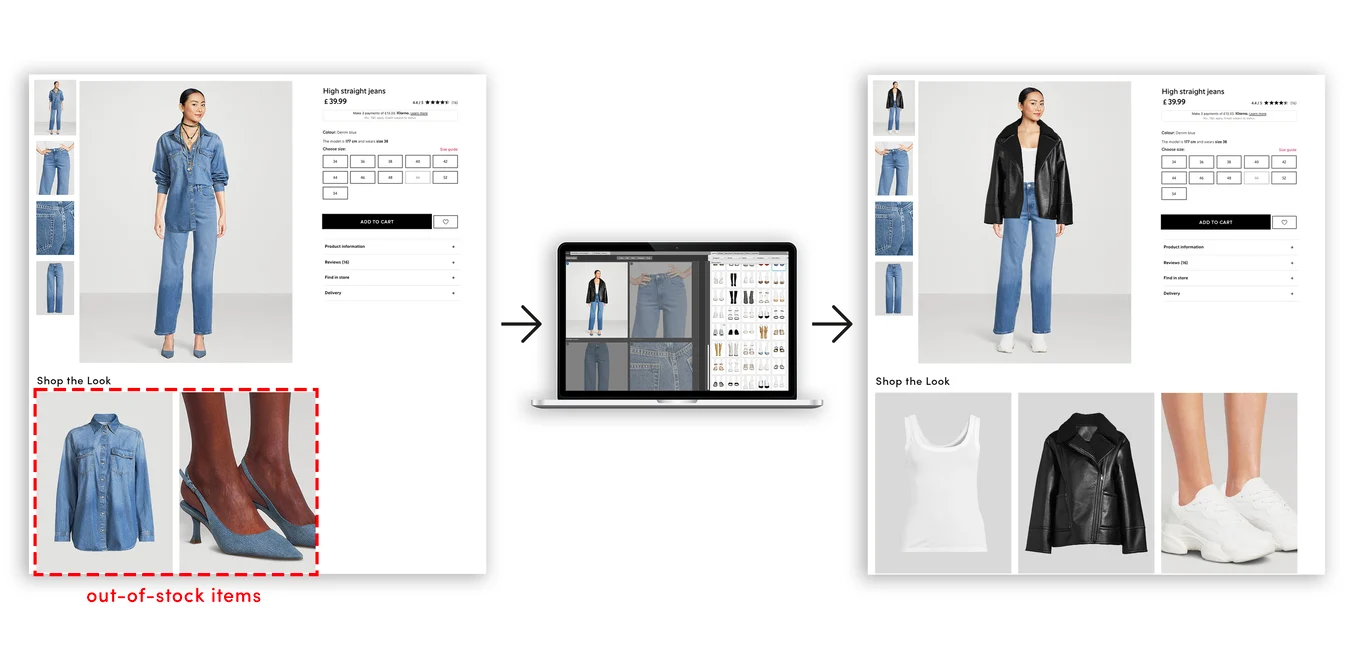
Boost revenue by showcasing only sellable items. In our digital styling software, Look Creator, you can seamlessly replace out-of-stock products with available stock for continuous sales.
Looklet’s Out of Stock feature has also been upgraded to display alerts, empowering your team to proactively identify images with out-of-stock items. They can swiftly restyle, export, and replace outdated images, ensuring that your visuals consistently feature up-to-date, in-stock items for sale.
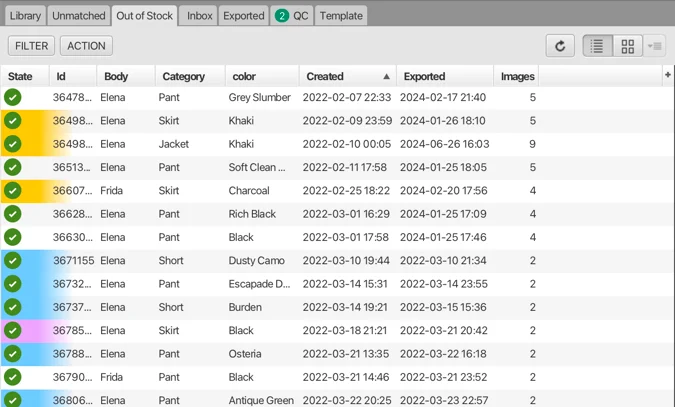
UX of updated Out-of-Stock alerts in Look Creator. Alerts allow your team to proactively identify, restyle and export new product images with only in-stock items.
Here are a few examples of how the newly improved Out of Stock feature can provide value to your business:
To address the challenges of maintaining updated on-model imagery, Looklet’s Out of Stock feature is a game-changer. Our technology enables efficient and creative capture of apparel product marketing and ecommerce photos, ensuring that your online inventory reflects current stock levels. Additionally, Looklet’s product photography tools offer automated capture, centering, and auto-cropping, providing a streamlined solution for producing high-quality, flexible product imagery.
By incorporating these automated tools into your photo production workflow, you can not only maintain up-to-date visuals but also enhance the overall website experience for customers, potentially increasing conversion rates and revenue.
Learn more about the Looklet products mentioned in this article:
Discover how our AI powered e-commerce solution combines the best of both worlds: real and AI generated models, along with advanced virtual dressing room technology to enhance your digital dressing experience. If you’re interested in learning more about how we can support your brand, feel free to reach out to us through the ‘Contact Us’ form at the bottom of this page!
Does AI Video Actually Convert on Product Pages? Here’s What Holt Renfrew’s Data Shows
Read the full blog post
Always On, Never Late: Staying Ahead of the Fashion Calendar with Looklet
Read the full blog post
Kids Clothing Photography For Ecommerce
Read the full blog post
 Dynamic, Flexible and On-Demand Digital Dressing